
Your Scores, Your Way
Checking scores is a top user journey in the ESPN app, but among the least personalized. I led the design direction for a more adaptive scores experience—bringing together relevant game context, fans’ individual interests, and greater control over how they follow the action.
Role: Lead Designer
Responsibilities: UI/UX, design systems, product strategy, storytelling, prototyping
Partners: Product, Engineering (Native and Web), Design Systems, Motion Design, Research, ESPN Stats and Data
Timeline: Early 2026 – 2027
Status: On target for early-mid 2027 launch
Scope: Redesigned scores experience across all sports and touch points
Platforms: iOS, Android, responsive web, tablet
The initial game plan was simply…
How can we improve scores?
The project began with an open-ended ask from leadership: explore how we could improve scores on ESPN. There were no prescribed features or solutions, no detailed product directions, and no definitive timeline.
I had the opportunity to lead this effort end-to-end, from the initial framing and research phases through solidifying final deliverables for development. And partnering with various teams along the way to make it happen.
Identifying challenges & opportunities
Phase 1: Research & Discovery
I gathered existing research from across ESPN to understand what we already knew about fans’ expectations for scores. Personalization emerged as a recurring theme: fans wanted and expected experiences like scores to reflect what they cared about. That gave us a strong starting point for exploring how scores could become more relevant to each fan’s unique intents.
Sport-by-sport and platform-by-platform, I conducted a comprehensive competitive analysis across 20+ sports, search, AI, social, and news products. I identified overarching patterns, user pain points, and areas of opportunity. This groundwork proved invaluable during the process of brainstorming and iteration.
Apple Sports
The Athletic
ATP Tour
Bleacher Report
CBS Sports
ChatGPT
DAZN
DraftKings
FanDuel
FIFA App
Flashscore
Formula 1
FOX Sports
Google Search
MLB App
NBA App
NCAA March Madness Live
NFL App
NHL App
Premier League
Real Sports
The Score
Sleeper
Sofascore
Yahoo Sports
365 Scores
Apple Sports The Athletic ATP Tour Bleacher Report CBS Sports ChatGPT DAZN DraftKings FanDuel FIFA App Flashscore Formula 1 FOX Sports Google Search MLB App NBA App NCAA March Madness Live NFL App NHL App Premier League Real Sports The Score Sleeper Sofascore Yahoo Sports 365 Scores
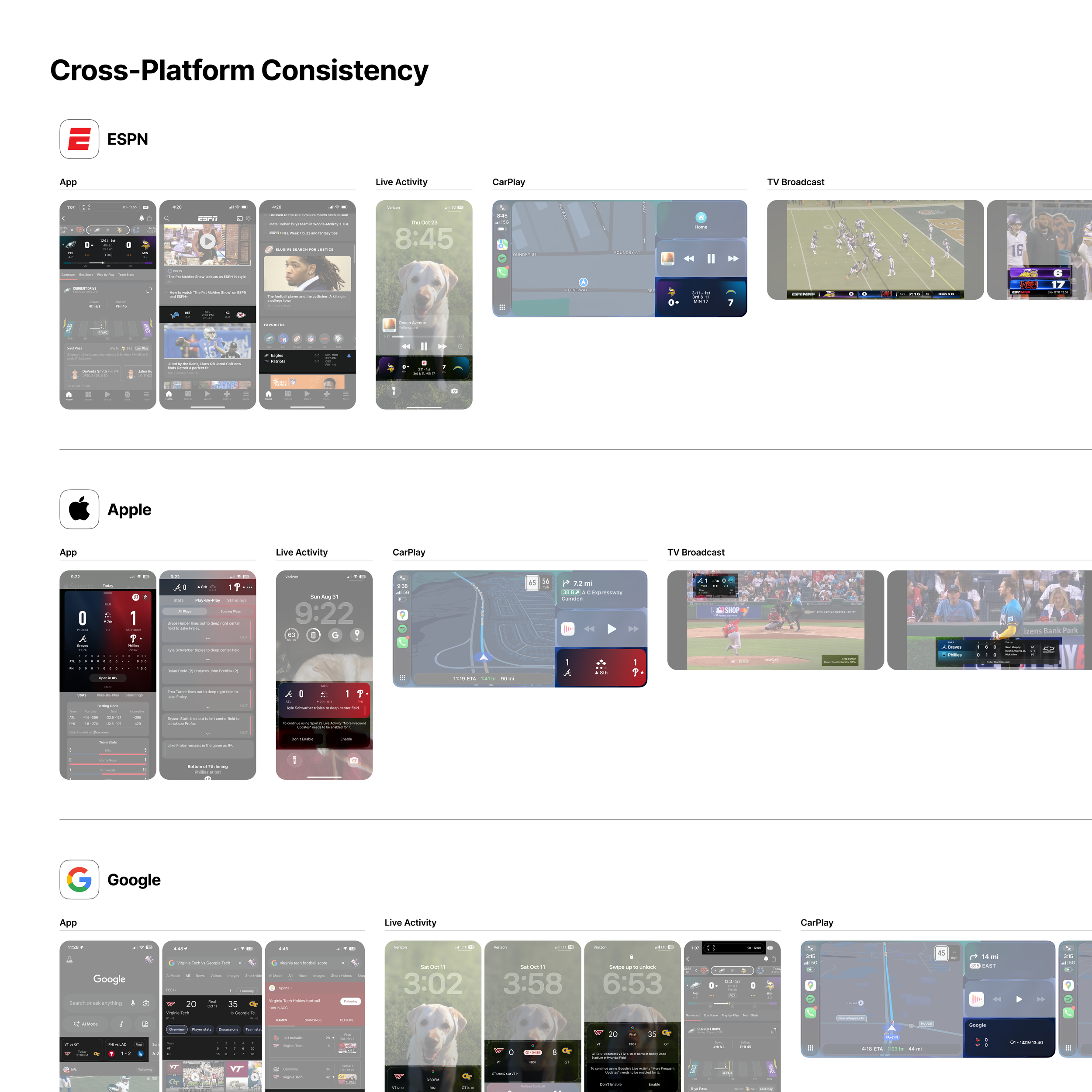
I compared how scores experiences adapt across mobile apps, desktop, Live Activities, CarPlay, living room devices, and even TV broadcasts—examining what stays consistent and what changes for each context.
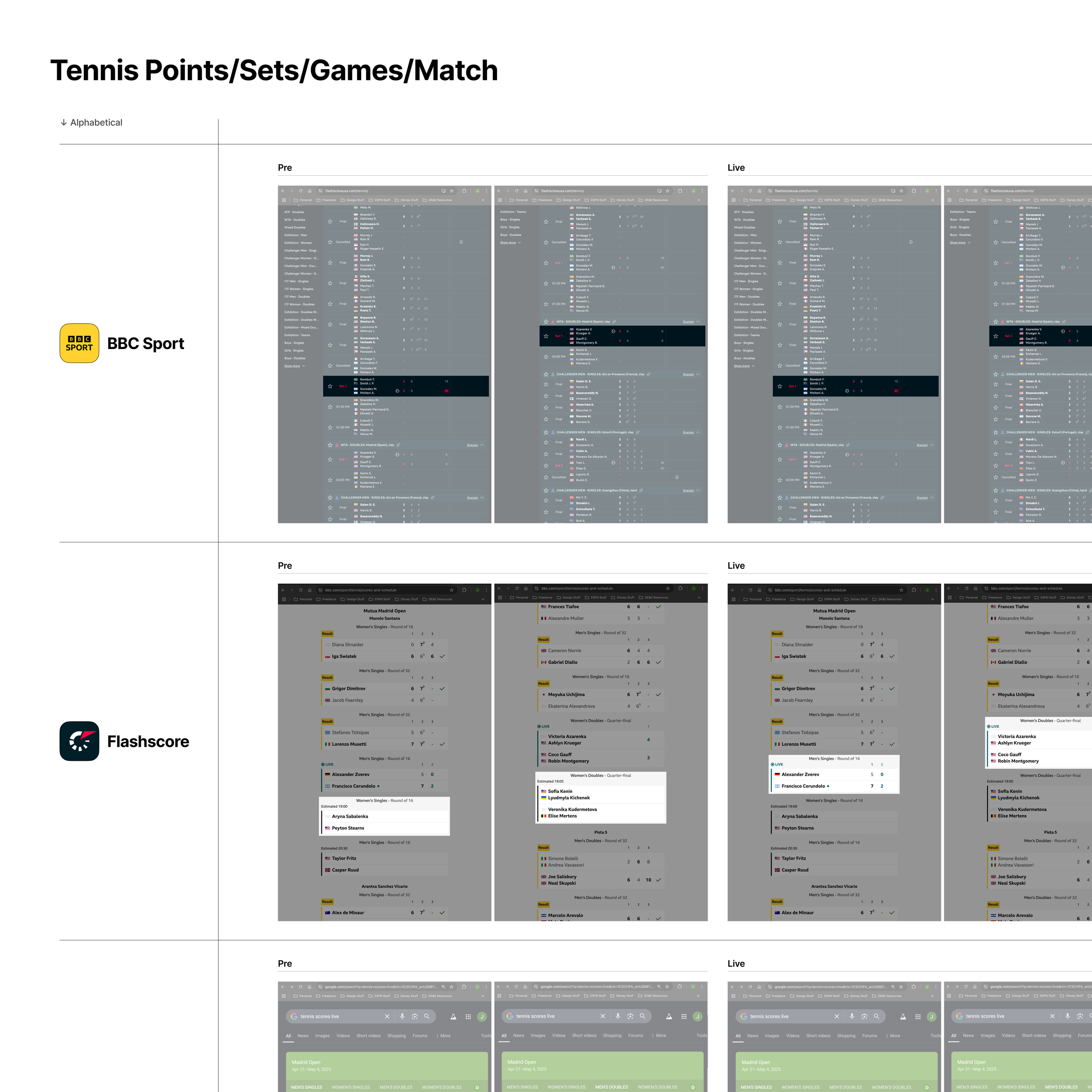
My analysis extended to the nuances of individual sports, like this example of how tennis scores communicate game/set/match progress, scoring hierarchy, and player information across game states.
Setting the tone, based on research
Personalization at the core
It was clear that fans wanted more personalization within scores, both explicit and implicit; and there was a gap in competitors’ personalization around scores. Especially in the age of AI, expectations around individually tailored experiences have never been higher.
The focus for initial brainstorming naturally centered on how to personalize scores to address individual fan intents. Every fan’s scores experience should reflect their unique fandom and match each moment with the right focus.
Critical User Journeys
Phase 2: Defining CUJs
Our use of Critical User Journeys (CUJs) bridge high-level user needs with measurable business outcomes. These concise, high-stakes paths map a user’s core goals to the minimum tasks required to achieve them.
Our primary CUJs for this effort honed in on personalization and autonomy, striving to move away from a one-size-fits-all approach to scores across ESPN.
CUJ 1:
I want to know why this game is worth my attention
On a personal level, why does this matter to me based on my favorite teams, sports, players, and topics?
On a broader level, why does this matter in the world of sports and culture generally?
CUJ 2:
I want personalized context into relevant fantasy, betting, and other interests
Fantasy team and player performances
Must-see highlights, trending storylines, top stats, injury updates, etc.
Active bet tracking
CUJ 3:
I want full control over how I view, consume, and manage my scores on ESPN
Giving users the ability to make scores their own
Allowing for autonomy in visual layout and content density
Putting pen to paper
Phase 3: Concepting & Ideation
From low-fidelity wireframes to high-fidelity mocks, concepts focused on establishing consistent patterns, improving visual hierarchy, and introducing autonomy and personalization.
Relying on a combination of hand-drawn sketching, Figma, and AI tools, I compiled a range of general concepts and design directions to consider moving forward with.
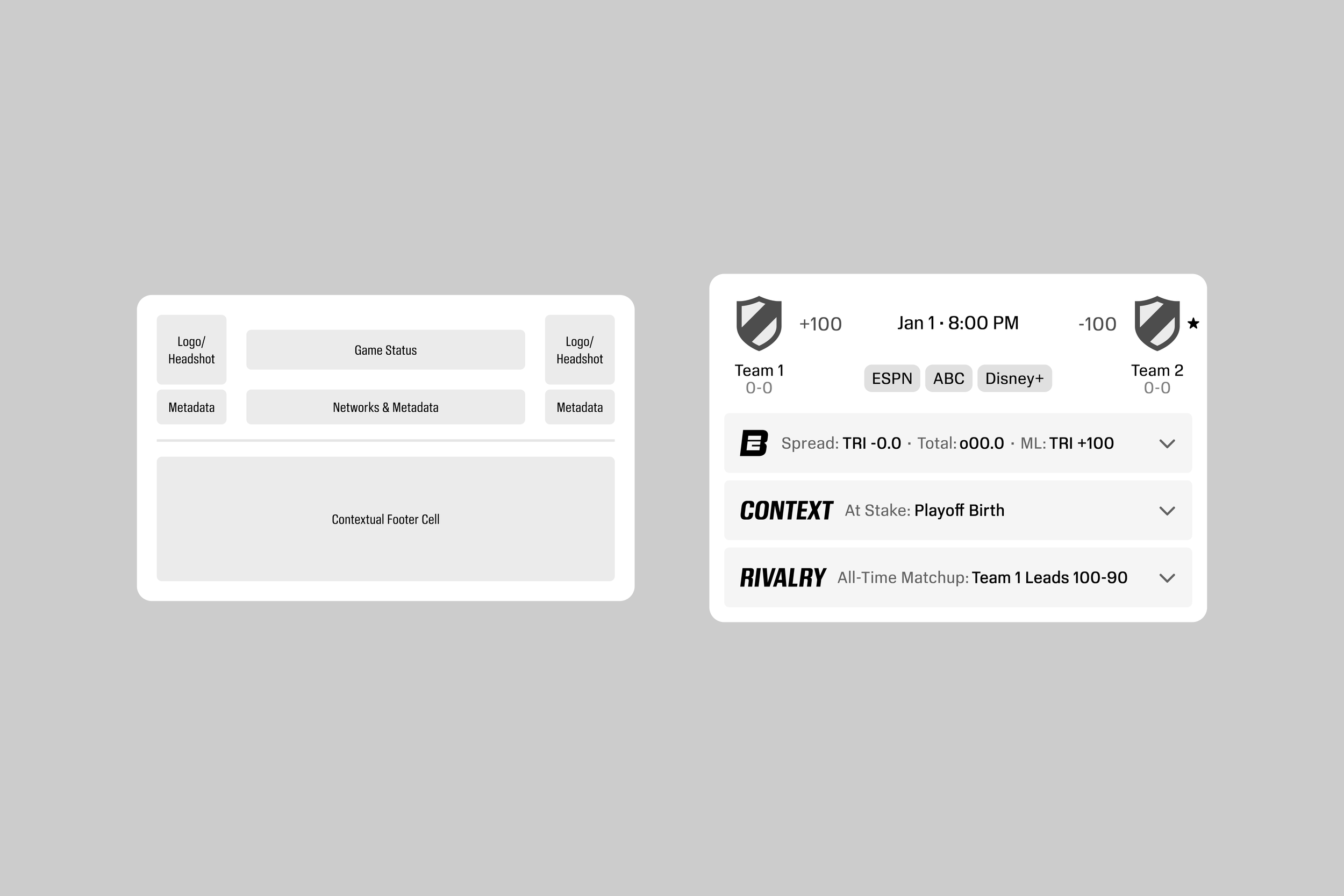
Dissecting core score component structures and exploring ways to add key context layers.
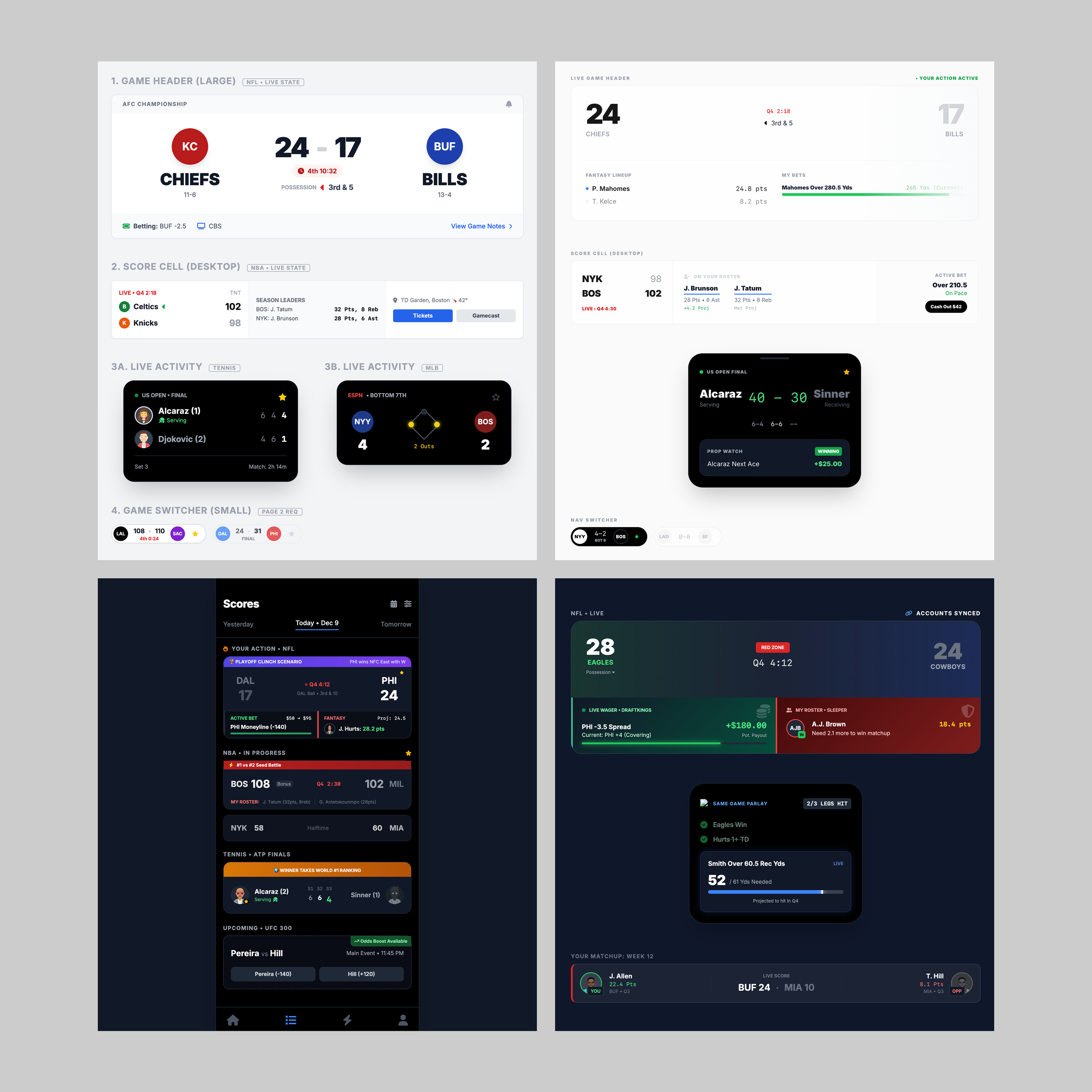
Early AI explorations from January of 2026 using Google’s AI Studio. My, how far AI has come since then…
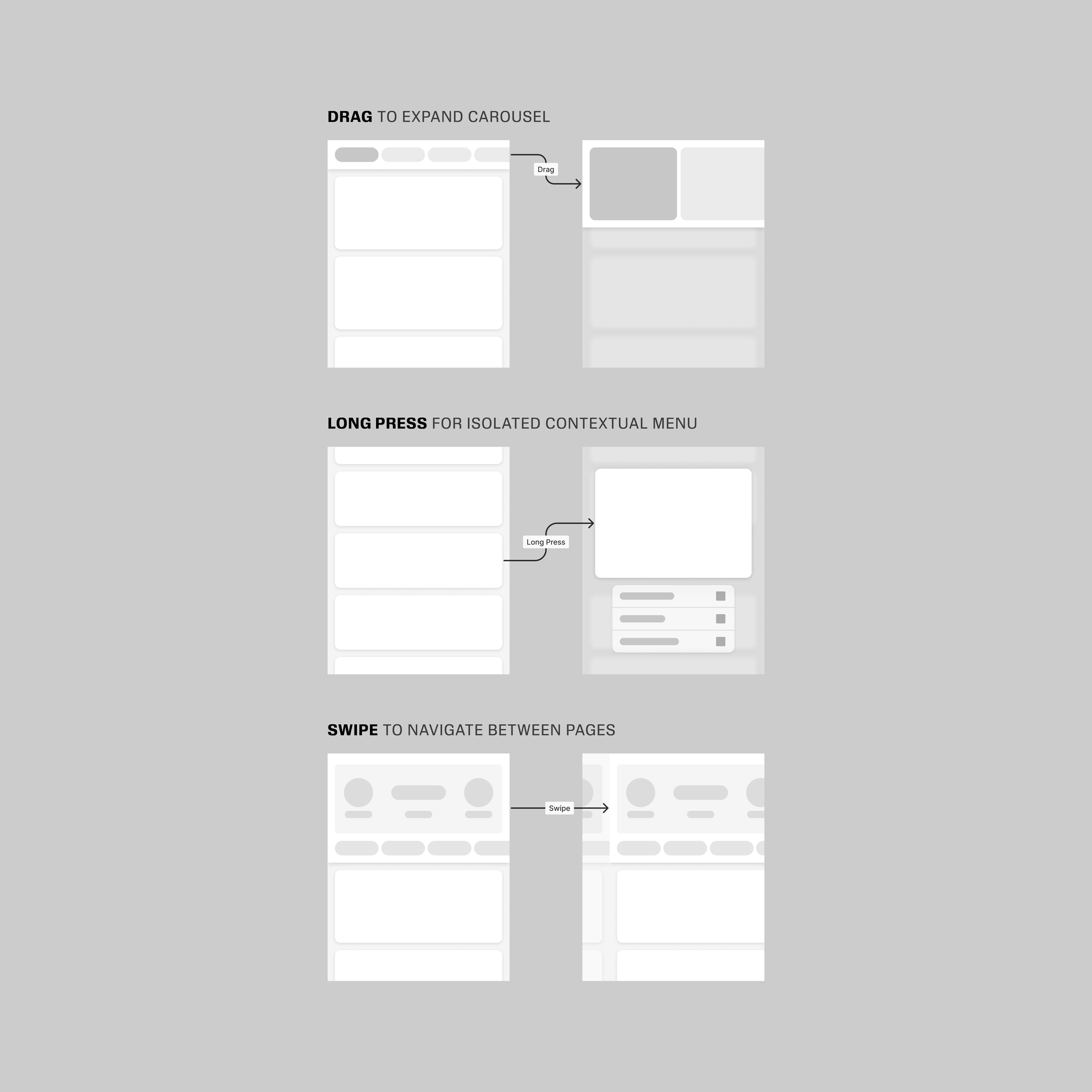
Gesture explorations to help fans dive deeper into and navigate through lists of scores.
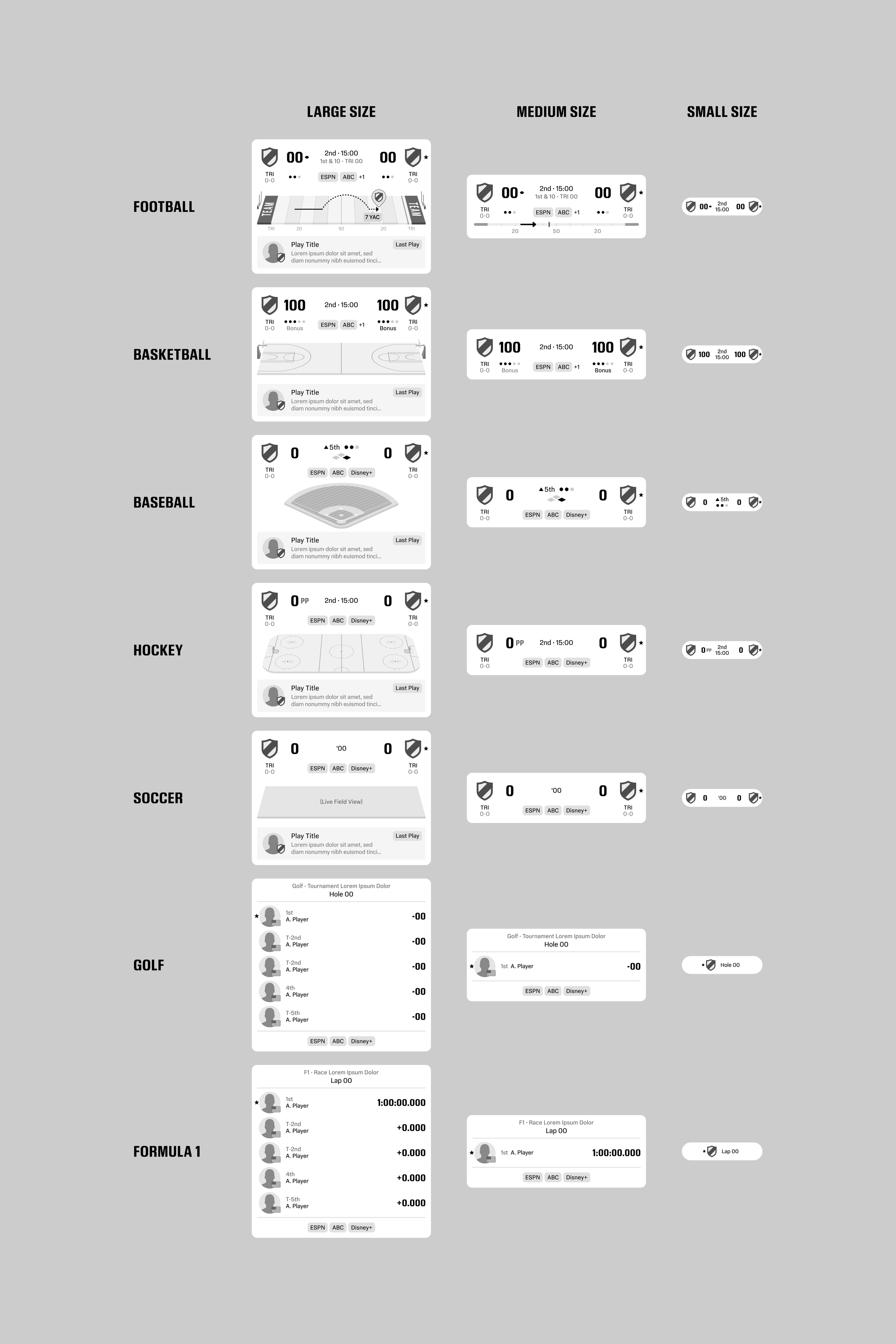
Sport-by-sport and size-by-size explorations, identifying differences and consistencies.
Establishing the narrative
The genesis of ‘Scores Your Way’
Our final experience was a flexible, preference-driven and modular system with universal context layers for all fans and layers of personalization for individual investments. Scores became a truly alive, adaptive feed that reflects your teams, bets, fantasy lineups, viewing context, top storylines, and more.
The term ‘Your Scores, Your Way’ originated as I was preparing a pitch deck to present to leadership. To me and my team, the phrase was a simple way to express the essence of what we were proposing—turning scores into the most personally relevant surface in the ESPN app.
Putting our best ideas to the test
Phase 4: Testing Top Directions
Once we honed in on the ideas we felt most confident in, it was time for dogfooding via mobile prototypes and mocks. Feedback from internal testing validated our general approach to a revamped scores experience across touch points, setting us on a path towards establishing a final direction.
In addition to new personalization features and heightened user autonomy, I made sport-by-sport updates to carefully assure the most relevant data was being surfaced in the most visually engaging ways, partnering with Product and Engineering throughout the process.
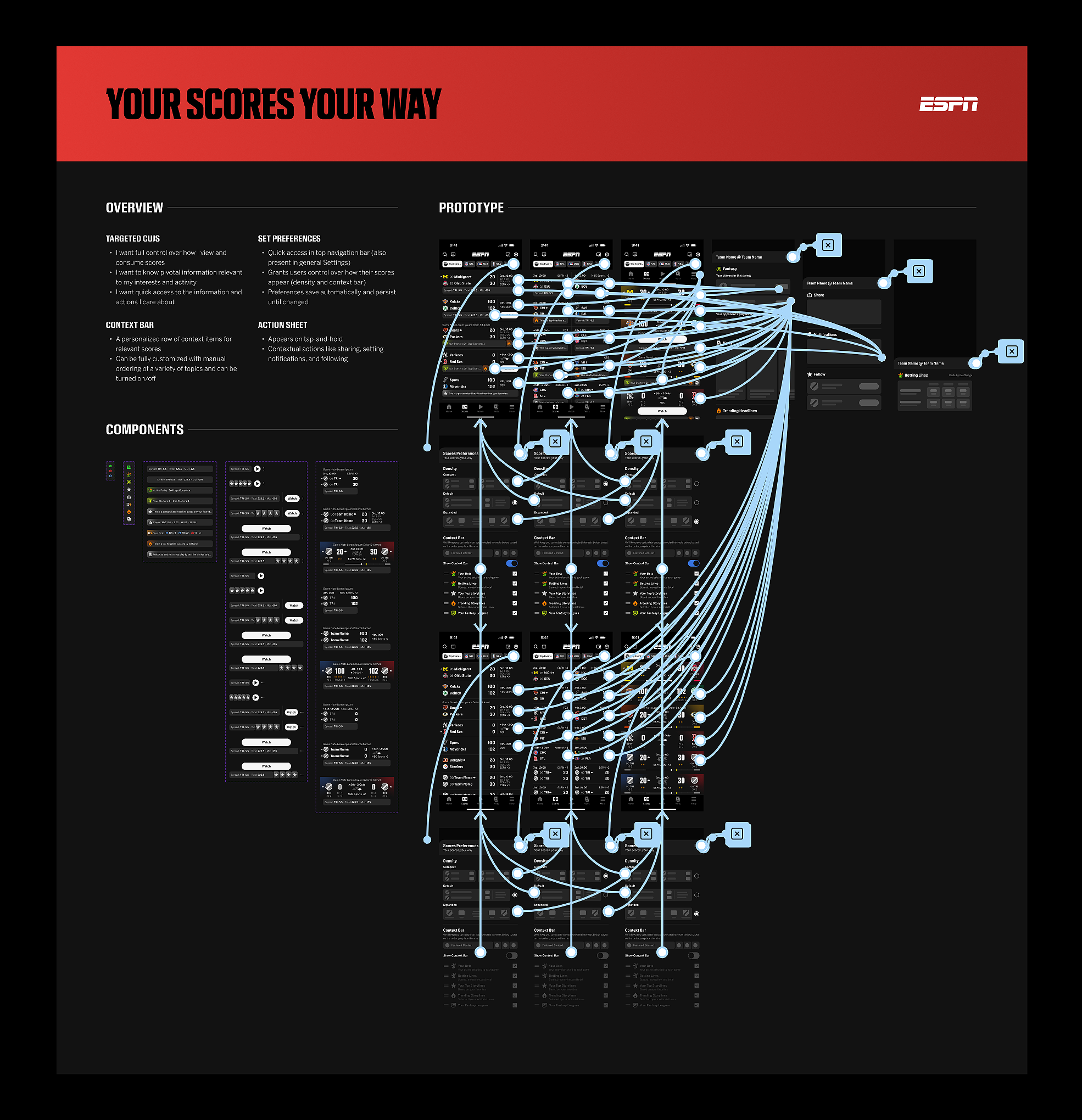
The initial mobile Figma prototype included the ability to customize scores preferences within a preferences panel, accessible via an icon action. Preferences included a density setting and a customizable “context bar,” which featured personalized information like fantasy stats, active bet tracking, and trending storylines.
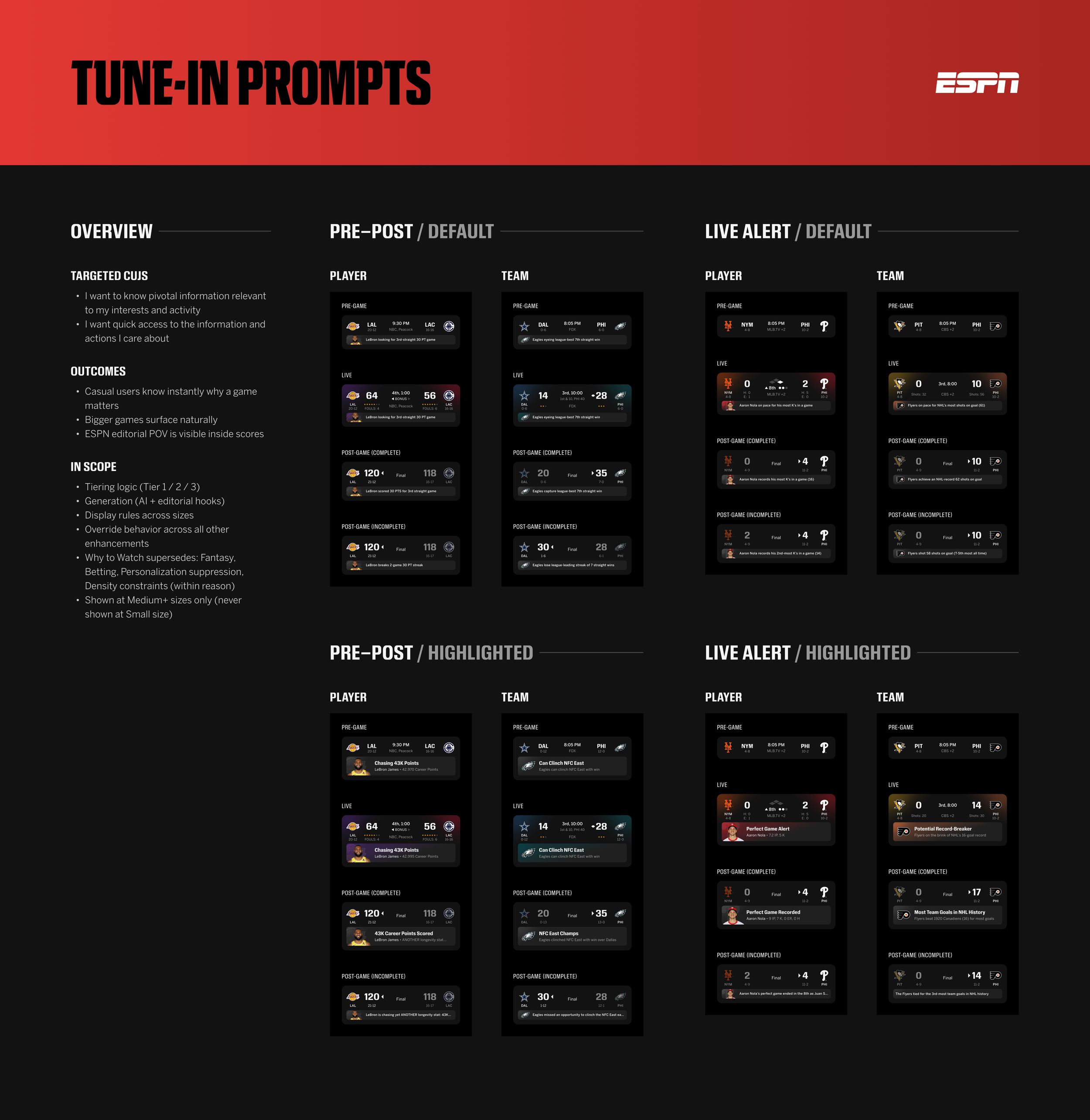
“Tune-in prompts” are special, rare callouts aimed at bringing attention to the biggest moments in sports (e.g., tracking a tennis star’s record-breaking performance or an MLB pitcher’s perfect game). They were designed to be elevated in the hierarchy of score cells to shine a light on rare moments in sports.
Further refinement and polish
Phase 5: Solidifying Final Designs
We made further refinements and polished visual elements during the process of internal testing and rounds of additional reviews, leading us to a final direction we felt confident in.
Especially after adding more personalization features like dynamic AI summaries and expanded context bar options, the resulting experience reflected the goals we set out to achieve.
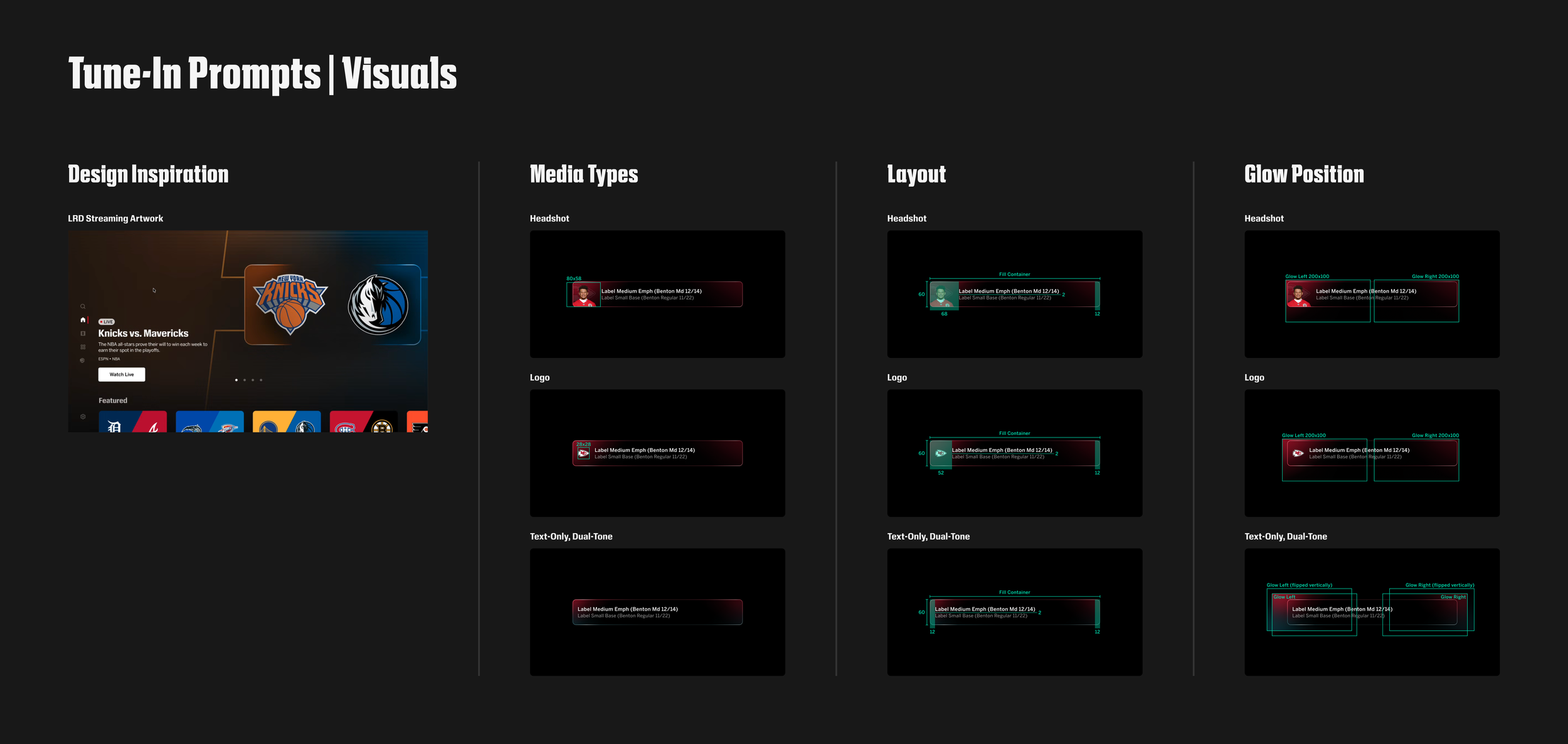
Visual overview of Tune-In Prompts, inspired by LRD streaming artwork created by an independent creative team that we partner with called ESPN Creative Studio.
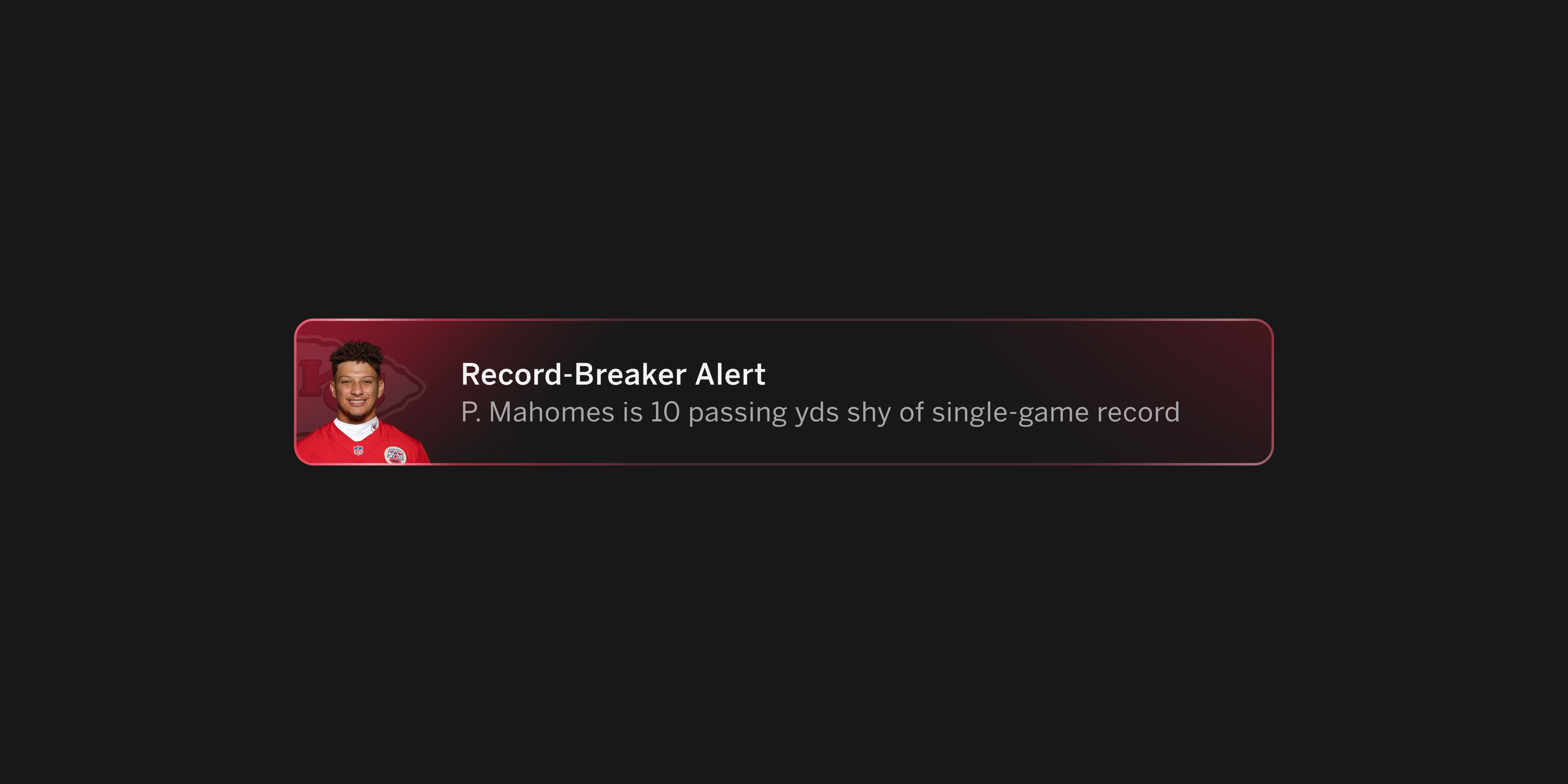
A closer look at a player-based Tune-In Prompt example.
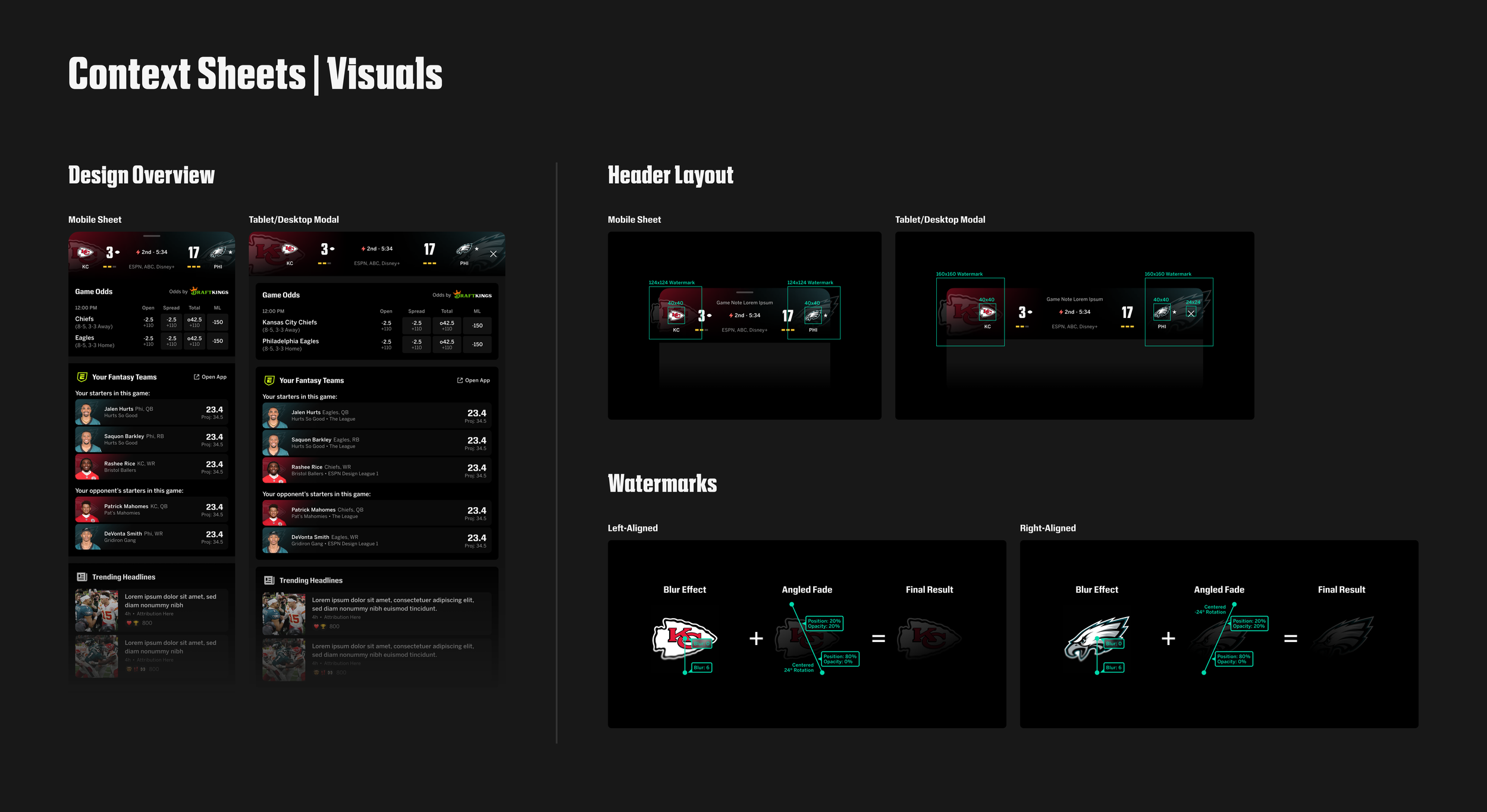
Visual overview of Context Sheets, which are expanded views of a user’s context bar—from detailed game odds and fantasy performers to injury reports and trending storylines.
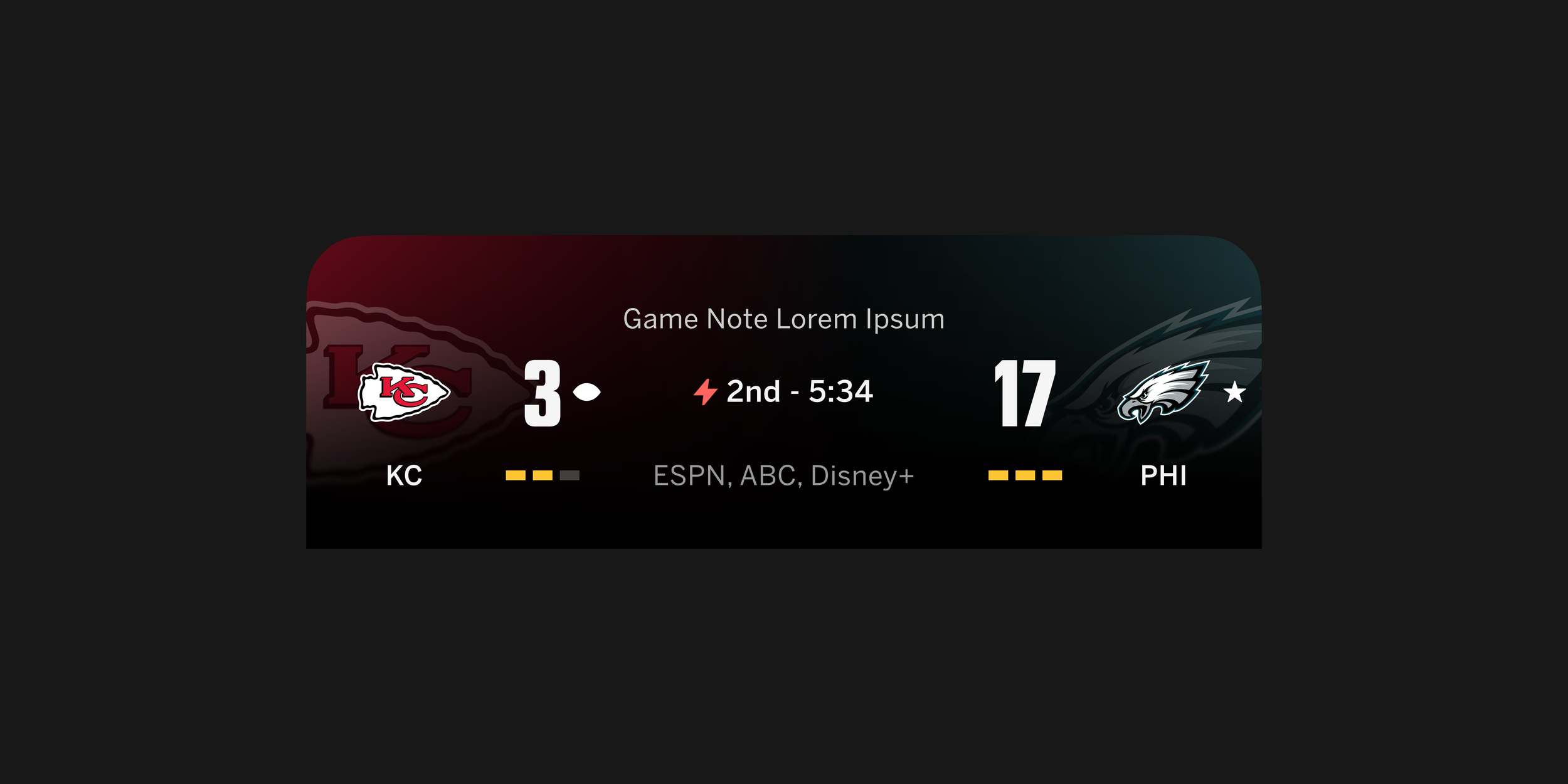
A closer look at new Context Sheet headers for team-vs-team matchups.
It takes a team to bring it to life
Phase 6: Delivery & Next Steps
I partnered with our Motion team on micro-interactions, Design Systems team on scalable new components (and updating existing components), and of course Product and Engineering teams along the way to bring this vision to life.
This project is in development and is scheduled to launch in 2027. We’re taking a phased approach to development, with Tune-In Prompts launching first (with existing scores designs) and the full-fledged redesign of scores arriving in mid-2027.
Achievements and learnings
Though this project is not yet fully completed and developed at the time of my writing this, I’ve been able to reflect on key wins and areas of growth/opportunity thus far.
Reflection So Far
Achievements / What Worked Well:
Turning ambiguity into a clear direction. Took an open-ended ask to “improve scores” and shaped it into a focused strategy grounded in personalization, relevant context, and fan control.
Designing a system that scales. Established flexible score components that accommodate different sports, game states, platforms, and information densities while maintaining a consistent experience.
Building alignment around a shared vision. Used prototypes and the “Your Scores, Your Way” narrative to make the direction tangible for leadership and cross-functional partners, helping move the work toward development.
What I Learned and Areas of Opportunity:
Personalization requires restraint. More information doesn’t automatically make scores more useful. The challenge is surfacing the right context at the right moment while preserving quick scanning and a clear hierarchy.
A shared narrative helps move complex work forward. I learned that framing the work clearly was as important as designing it. “Your Scores, Your Way” gave cross-functional partners a shared way to understand the vision and connect individual features to the broader purpose.
Success needs to extend beyond delivery. After launch, evaluate whether fans find relevant games more easily, understand game context faster, and use the new features—then refine the experience based on those findings.